登录验证码发送间隔限制的设计与实现
登录验证码发送间隔限制的设计与实现
引言
在小项目设计登录模块时,一个常见的思路是账号与邮箱/手机号绑定,通过邮件/短信验证码的方式登录/注册。相比于传统的口令式注册/登录有以下优点:
- 用户不需要记住密码:只要邮箱/手机号还能用,就可以登录。
- 系统不需要考虑太多安全问题:数据库不存储敏感信息,安全性由邮箱/电信运营商保障。
- 登录、注册合一:简化开发。
发送邮件/短信验证码一般都要通过云厂商的服务来实现,如果有人恶意刷接口就会产生大量费用。而且登录验证码本身也是一段时间内有效的,不需要频繁调用。所以我们需要对发送验证码的接口做调用时间间隔的限制。
本文用 vue3 + element plus + springboot 的技术栈举例。重点在分享思路,在使用其他技术栈的情况下也可以套用。
后端
目的:对于同一个邮箱来说,一分钟内最多发送一次验证码。
思路:使用 Caffeine 库的 Cache 类,过期策略是写后 1 分钟过期。key 存放邮箱,value 存一个 new Object()(我们可以称之为 timer)。发送验证码之前先检查 cache 里邮箱对应的 timer 是否还在,如果还在说明 1 分钟内发过验证码,拒绝重复发送;如果不在就可以发。
实现:
1 | /** |
利用了 Cache 的线程安全的特性,不必手动写同步锁。
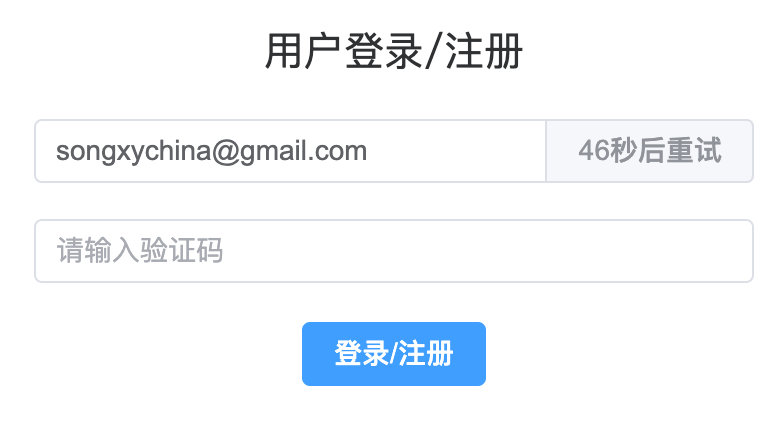
这样,后端层面就限制了发送间隔,不过前端用户难以感知到 1 分钟的间隔有多久,所以我们最好在前端实现一个 1 分钟的倒计时。并且在期间禁用发送按钮,避免用户连续点击发起重复的请求。
前端
为了突出重点,省略了无关的组件、样式和代码
1 | <template> |
效果
点击前:

点击后:
总结
本文介绍了登录验证码发送间隔限制在后端和前端的设计与实现。希望可以为有类似需求的朋友节省时间。
本博客所有文章除特别声明外,均采用 CC BY-NC-SA 4.0 许可协议。转载请注明来源 白烛魁的小站!
相关推荐

2022-11-09
Docker方式安装常用软件(如MySQL, Redis等)
Docker 方式安装常用软件(如MySQL,Redis等)Why Docker?我决定用docker容器完全替代直接安装在本机上的 mysql, redis 等软件, 理由如下: 轻量级: 只会安装必要组件, 节省内存和硬盘. 例如 mysql, 我们一般只需要一个 mysql 服务器, 像 mysql 自带的命令行客户端, workbench 等组件其实都是多余的. 安装简单: 只要有docker环境, 只需要一个文件和一行命令即可安装。 隔离: 镜像内自带必要依赖. 再也不用担心缺少依赖或者依赖冲突了 统一: 启动/停止/重启都通过统一的 docker 命令来实现,会 docker 就可以,做到一通百通。降低学习成本。 易拆卸: 安装/卸载/修改版本对于容器来说是很简单的, 不会对主机环境有任何影响 跨平台:部分软件可能只有 linux 版本, 或者适用于你系统的版本安装起来很麻烦, 使用 docker 就可以避免这个问题, 因为容器都是运行在 linux 基础上的. 准备工作为了能够访问到容器,并实现容器间互联。我这...

2025-05-11
《数据密集型应用系统设计》(DDIA)阅读笔记
前言《数据密集型应用系统设计》(Designing Data-Intensive Applications,简称 DDIA)是分布式系统领域的经典著作,深入探讨了数据系统的底层原理、分布式计算的实践挑战,以及如何构建可靠、可扩展、可维护的应用。本文是我阅读本书后的核心要点记录与思考。 结论先行本书的核心价值在于:帮助技术决策者理解各种数据系统和架构方案背后的权衡取舍。无论是存储引擎的选择、数据复制策略、还是分布式事务的处理,都不存在银弹,只有在具体场景下的最优解。理解这些权衡的本质,才能做出明智的技术决策。 一、数据系统的底层原理数据的存储结构对于如何在磁盘上组织数据,有两个主要的数据结构:B-Tree 和 LSM-Tree。两者各有优劣,适用于不同的场景。 LSM-Tree(日志结构合并树) 这是一张描述 LSM-Tree 存储结构的图,出自这篇文章。该作者的 mini-bitcask 项目基于 LSM-Tree 实现了一个简单的数据库,非常适合新手学习。 核心思想: LSM-Tree 的核心思想是以追加日志的形式组织数据,在内存中维护索引,索引保存的是一条数据在日志文件中的偏...